Linkchecker: A free tool to find broken links and images (Optimized for WordPress)
I have written on this site since 2018. Over those years, links go bad. Sites shut down. Pages move. Images vanish.
Most recently, the massive PHP security bug required me to migrate this site to an entirely new WordPress instance, which revealed that I had several image links pointing to an old hard-coded numeric IP address, not a domain name.
Broken links are frustrating for readers, and will also lower your search engine score over time.
So I built a small tool to find these links for me and recommend search-and-replace updates.
It’s called linkchecker. It’s free, it’s open source (linkchecker on GitHub), and it works on any website that renders pages server-side, such as WordPress-driven sites.
What it found on my own site
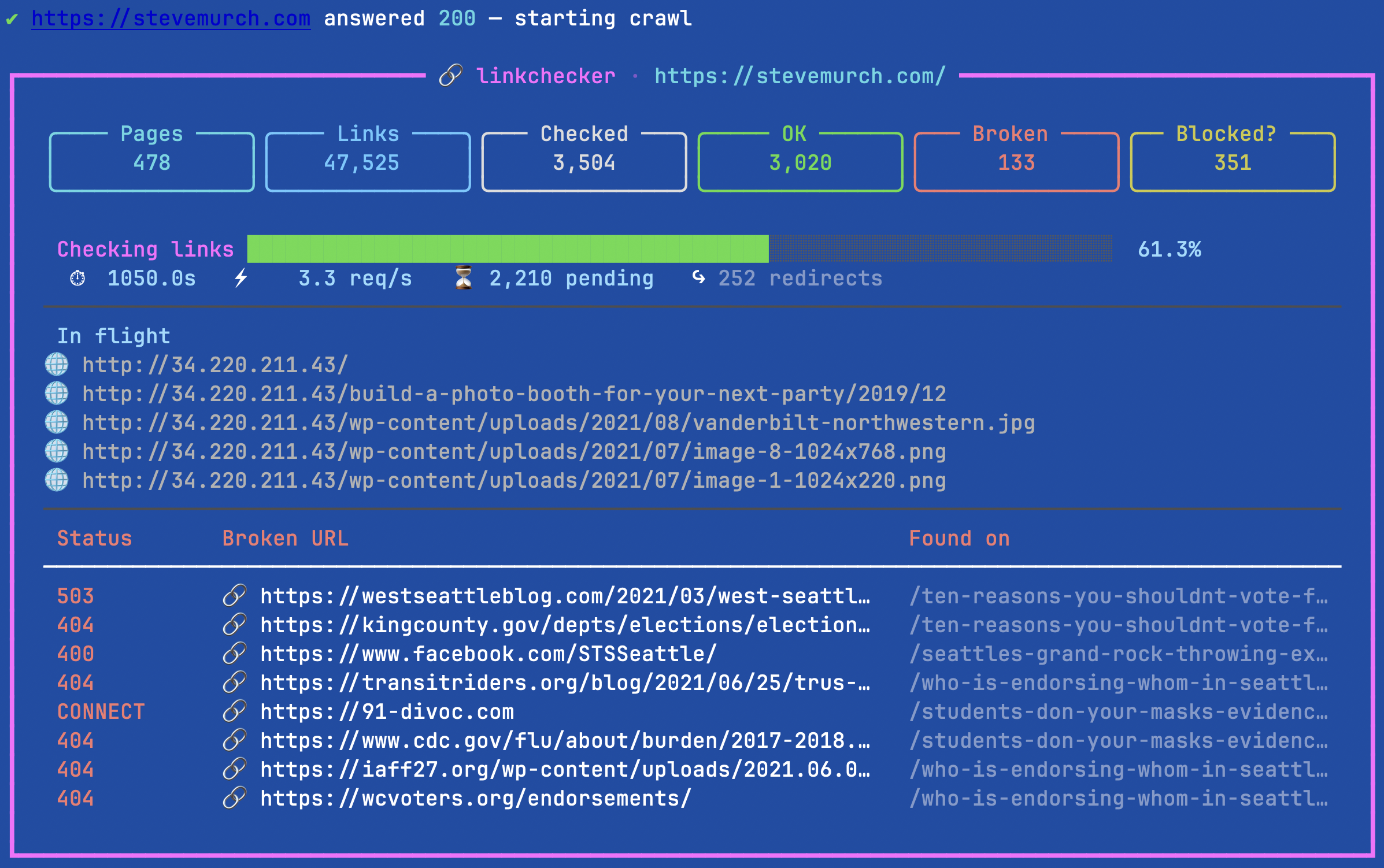
I pointed it at stevemurch.com first. It crawled 506 pages and checked 5,597 links. Here is what it found:
- 12 missing images
- 144 broken links
- 394 links that used a bare IP address instead of my domain
That last number surprised me!
Years ago, I moved this blog to a new server. Posts I wrote on the old server kept the IP address in many early links and image URLs, for example https://42.195.231.44/wp-content/uploads/....
Those links worked for a while. Then the old static IP address went away, and they all broke at once.
The good news: one search and replace fixes most of them. For WordPress users, I recommend the free “Better Search Replace” utility, which installs to the Tools menu on the admin dashboard.
My linkchecker utility told me exactly which search-replaces to run.
What it does
- Crawls the whole site. It starts at the home page and the sitemap, then follows every link.
- Checks every link, on your site and on other sites.
- Finds missing images wherever they hide: normal images, every size in
srcset, lazy-loaded images, and the preview images that social sites use. - Flags links that use an IP address, and gives you the correct URL.
- Recommends fixes, and tests them first. If many broken links share one old address (let’s say an old IP address), it tries a search-and-replace fix on a few sample URLs. It only recommends the fix if those URLs return 200 OK successfully.
- Keeps “blocked” apart from “broken.” Sites like LinkedIn and Amazon refuse automated checks. Those links usually work in a browser, so the tool lists them for you to check by hand. It does not call them broken.
- Is polite to other sites. It sends at most three requests at a time to any one outside site.
A checklist you can work through
Each run saves a report. The main one is a Markdown checklist, grouped by the page you need to edit. Each fix is a checkbox. I import mine into Bear and tick them off as I go. There is also a CSV for spreadsheets and a JSON file for scripts.
Known Limitation
linkchecker is designed for server-rendered sites like those powered by WordPress. It only reads the HTML that a server sends. It does not run JavaScript to “hydrate” a page. So, it misses links that a script adds after the page loads.
That particularly matters for “single-page apps” built with React or Angular, where the server sends a nearly empty page and JavaScript builds the rest. Sites that build pages on the server, like WordPress and most Next.js sites, work fine. But feel free to fork the Github repo and add such a feature using Playwright or a local rendering engine.
How to try it
You need uv, a free Python tool. Then run one line:
uv run https://raw.githubusercontent.com/stevemur/linkchecker/main/linkchecker.py https://example.com
Put your own site in place of example.com. There is nothing else to install.
For a quick trial, add --max-pages 50 to stop after 50 pages.
Bulk Search-and-Replace: A word of caution
Before running any bulk changes like search-and-replace, back up your database first. A search and replace changes every matching row at once, and you can’t undo it. The tool says this too, more than once, and for good reason.
Get it
The code and full instructions are on GitHub:
https://github.com/stevemur/linkchecker
It’s MIT licensed, so use it however you like. If you find a bug or have an idea, open an issue. And if it finds a pile of broken links on your site, you’re in good company. It found plenty on mine.